Stop Paying for Leads: How to Extract Unlimited B2B Emails Using Google Maps?
Stop Paying for Leads: How to Extract Unlimited B2B Emails Using Google Maps?
Every agency owner, freelancer, and B2B marketer faces the same nightmare: Running out of leads. You buy expensive databases, scour LinkedIn manually, and waste hours copying data into Excel. But at the end of the day, your pipeline is dry, and your wallet is lighter. Most professionals rely on tools like Apollo, ZoomInfo, or Sales Navigator, but they come with heavy restrictions:
- Credit Limits: You can only export 50 or 100 emails a month.
- Heavy Subscriptions: You pay $99+ every single month, whether you land clients or not.
- Stale Data: Often, the databases are months (or years) old.
What if you could turn the world’s biggest business database—Google Maps—into your personal ATM? Here is the exact strategy to extract fresh, unlimited B2B leads without the monthly fees.
Why Google Maps is the King of B2B Data
Google Maps holds over 200 million businesses, and for smart marketers, it’s a goldmine. Unlike static databases, Google Maps data wins because of:
- Real-Time Accuracy: When a business opens or moves, they update Google Maps immediately. You are pitching active businesses, not “ghost” listings.
- Laser-Targeted Niches: You can search for incredibly specific leads, like “Pediatric Dentists in Brooklyn” or “Vegan Bakeries in Austin.”
- Unlimited Volume: There are no credit limits. Whether you need 50 leads or 50,000, the data is waiting for you.
The Problem: The “Manual Trap”
The data is there, but getting it out is painful. Copy-pasting names and numbers takes about 3 minutes per lead. To get 100 leads, you’d need 5 hours of boring work. This is where automation changes the game.
Step 1: Scrape the Source with Monster Data Machine
Monster Data Machine is designed to scrape thousands of businesses from Google Maps in minutes. It extracts:
- Business Name & Category
- Website URLs (The key to getting emails!)
- GMB Status (Claimed/Unclaimed)
Step 2: The “Missing Link” – Extracting Hidden Emails
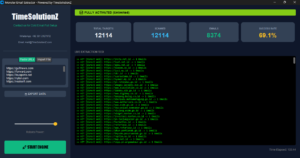
Google Maps does not show email addresses directly to prevent spam. This is where most people give up. To build a fully automated machine, you must pair your map data with Monster Email Extractor.
Enter Monster Email Extractor: Deep Crawl Technology
Unlike free scrapers that only look at a homepage, Monster Email Extractor visits the websites you found on Google Maps and digs deeper.
Key Features That Change the Game:
- Deep Crawl: It scans “Contact Us” pages, “About Us” pages, footers, and even hidden mailto links in the code.
- Intelligent Pattern Recognition: It filters out “junk” emails (like example@domain.com) and focuses on valid business contacts.
- Bulk Processing: Just paste your list of website URLs, click start, and watch the live extraction feed.
Strategy: The “Unclaimed GMB” Pitch
This is a bonus strategy for high-paying clients. Use Monster Data Machine to filter for listings where Unclaimed = Yes.
The Pitch:
Find their email using the extractor and send this:
“Hi [Name], I noticed your Google Maps listing for [Business Name] is currently unclaimed. This allows anyone to edit your hours or mark you as closed. I can secure this for you today. Are you free for a 5-minute chat?”
This solves a scary problem for the owner and gets you a foot in the door instantly.
Comparison: Subscription vs. Lifetime Ownership
Why rent your data when you can own it?
| Feature | Competitor Tools (Apollo/ZoomInfo) | Monster Tool Suite |
| Cost | $99/Month (Recurring) | $30 One-Time Fee |
| Leads | Limited by Credits | Unlimited |
| Data Freshness | Often Outdated | Real-Time (Fresh from Web) |
| Ease of Use | Complex Dashboards | Simple 3-Step Process |
Conclusion: Stop Renting, Start Scaling
In 2025, data should be free. You shouldn’t be paying per lead to a company that sells the same list to your competitors.
- Scrape the source (Google Maps) with Monster Data Machine.
- Enrich the data (Get Emails) with Monster Email Extractor.
- Launch your campaign and own your market.
[Click Here to Download Monster Email Extractor & Data Machine Now]
Take control of your lead generation today and say goodbye to expensive monthly subscriptions!
Stop Paying for Leads: How to Extract Unlimited B2B Emails Using Google Maps? Read More »